

Need to find your SureCart Product ID, Price ID, or Checkout Form ID in WordPress? These IDs are required for custom checkout setups, shortcodes, API work, and automation tools.
This guide shows you exactly where to find each SureCart ID, with simple steps and examples you can follow in minutes.
You’ll learn how to:
- Find your SureCart Product ID
- Locate your SureCart Price ID
- Get your Checkout Form ID
- Use these IDs in shortcodes and custom setups
- Avoid common ID mistakes
What Is a SureCart Product ID?
A SureCart Product ID is the unique identifier assigned to each product in your store. You’ll need it when embedding products, building custom checkout flows, or connecting SureCart to external tools.
How to Find Your SureCart Product ID
- Log in to your WordPress dashboard.
- Go to SureCart → Products.
- Hover over the product and click Edit.
- Look at the browser URL:
https://yourdomain.com/wp-admin/admin.php?page=sc-products&action=edit&id=73d20c41-425e-4593-81b7-9402aafc3ddb - The value after
id=is your Product ID.
Example:
URL:https://yourdomain.com/wp-admin/admin.php?page=sc-products&action=edit&id=73d20c41-425e-4593-81b7-9402aafc3ddb
Product ID =73d20c41-425e-4593-81b7-9402aafc3ddb
What Is a SureCart Price ID?
A SureCart Price ID identifies a specific pricing option for a product – such as a one-time purchase, monthly plan, or annual plan.
You’ll often need the Price ID when customizing checkout buttons, forms, or integrations like Zapier.
How to Find Your SureCart Price ID
- Go to SureCart → Products.
- Open the product you want to edit.
- Scroll to the Pricing section.
- Find the price option you need.
- Click Copy Price ID.
Example Price ID:
52df0e97-b89a-12d2-ab6e-3dd7aab49565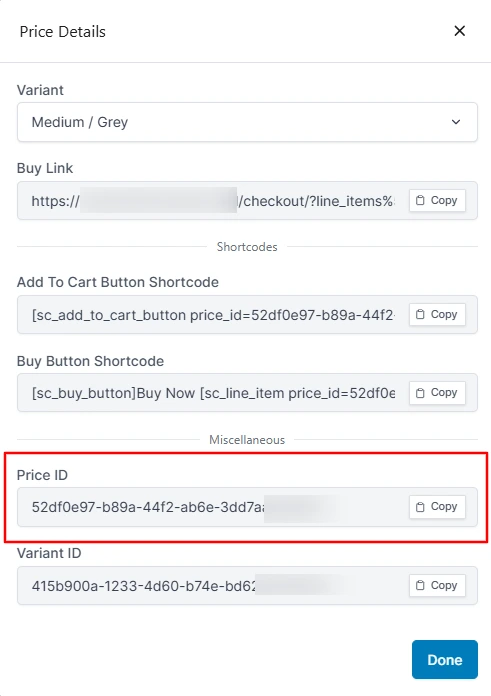
What Is a SureCart Checkout Form ID?
A SureCart Checkout Form ID (also called Form ID) is the unique ID for each custom checkout form you create.
Use the Form ID to:
- Embed checkout forms with shortcodes
- Trigger custom actions
- Track form-specific conversions
How to Find Your SureCart Form ID
- Go to SureCart → Custom Forms.
- Open the form you want to edit.
- Check the browser URL:
https://yourdomain.com/wp-admin/post.php?post=67890&action=edit
In this example, 67890 is your Checkout Form ID.
SureCart ID Cheat Sheet
| SureCart ID Type | Where to Find It | Example |
|---|---|---|
| Product ID | SureCart → Products → Edit → URL (id=) | 73d20c41-425e-4593-81b7-9402aafc3ddb |
| Price ID | Product → Pricing → Copy Price ID | 52df0e97-b89a-12d2-ab6e-3dd7aab49565 |
| Checkout Form ID | SureCart → Custom Forms → Edit → URL (post=) | 67890 |
Tips for Using SureCart IDs Correctly
Copy IDs instead of typing them.
Manual entry often causes broken shortcodes and failed checkout embeds. Use Copy Price ID whenever available.
Keep a simple ID reference list.
Save your Product IDs, Price IDs, and Form IDs in one place so you can reuse them quickly.
Test before publishing.
Always test checkout links and form embeds on a staging site or draft page first.
Use shortcodes with the correct ID.
Example product title shortcode:
[sc_product_title id="12345-asda-asdas-11sd-aaa"]Example checkout form shortcode:
[sc_form id="67890"]Final Thoughts
Once you know how to find your SureCart Product ID, Price ID, and Checkout Form ID, custom setups become much easier – from shortcodes to automations and API connections.
Bookmark this guide so you can quickly locate the right SureCart IDs whenever you need them.

More from the blog
-

Wishlist 1.0.1: the heart stays with the variant
The wishlist heart stays clickable with image zoom, updates when the shopper changes a variant, and…
-
Toolbox 1.2.4: hold downloads until a date
Hold a file until a date and time, or limit who can download it, for the…
-

Introducing CartCubes Discount Rules for FluentCart
Automatic discounts for FluentCart, with no coupon code. Percentage off, fixed amount, fixed price, quantity tiers,…