Applies to: CartCubes mobile app
Viewing subscription details is free – connect your store with a secret API token and open any subscription from the Subscriptions tab. No SureCart app license is required to browse status, pricing, upcoming billing, past periods, purchases or customer contact info.
Open a subscription
- Tap Subscriptions in the bottom tab bar.
- Search or filter the list if you need to find a specific recurring customer.
- Tap any subscription card to open its detail screen.
You can also open a subscription from a customer profile or when reviewing subscription-type orders.
Status and renewal
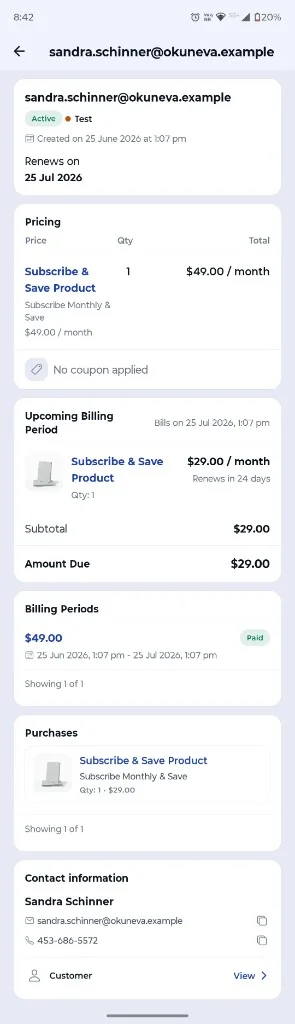
At the top of the screen you see the customer identifier, subscription status and key dates:
- Status badge – active, trialing, past due, canceled and more
- Test badge – when the subscription is from SureCart test mode
- Created date – when the subscription started
- Renews on – next billing date (or trial end / cancel date when applicable)
Pricing, billing and customer
Scroll down for the full recurring picture:
- Pricing – product, price name, quantity, recurring rate and any applied coupon
- Upcoming billing period – what bills next, subtotal, discounts and amount due
- Billing periods – past charges with paid/unpaid status and date ranges; tap Load more for older periods
- Purchases – access grants tied to the subscription
- Contact information – name, email and phone with copy buttons; tap View to open the customer profile
Tip
Need to narrow a long subscription list first? See Filtering orders & subscriptions for search and filter options.