


Coupon codes are easy to forget, and they are easy to share past the sale you meant to run. CartCubes Discount Rules for FluentCart applies the discount on its own. A shopper does not need a code. A FluentCart coupon can still apply on the same order.
It lives inside FluentCart
Discount Rules is not a separate coupon tool. Open it from the FluentCart admin menu, or from More on the FluentCart top bar. The list has All, Active, and Inactive tabs, search, and a status badge on every row.
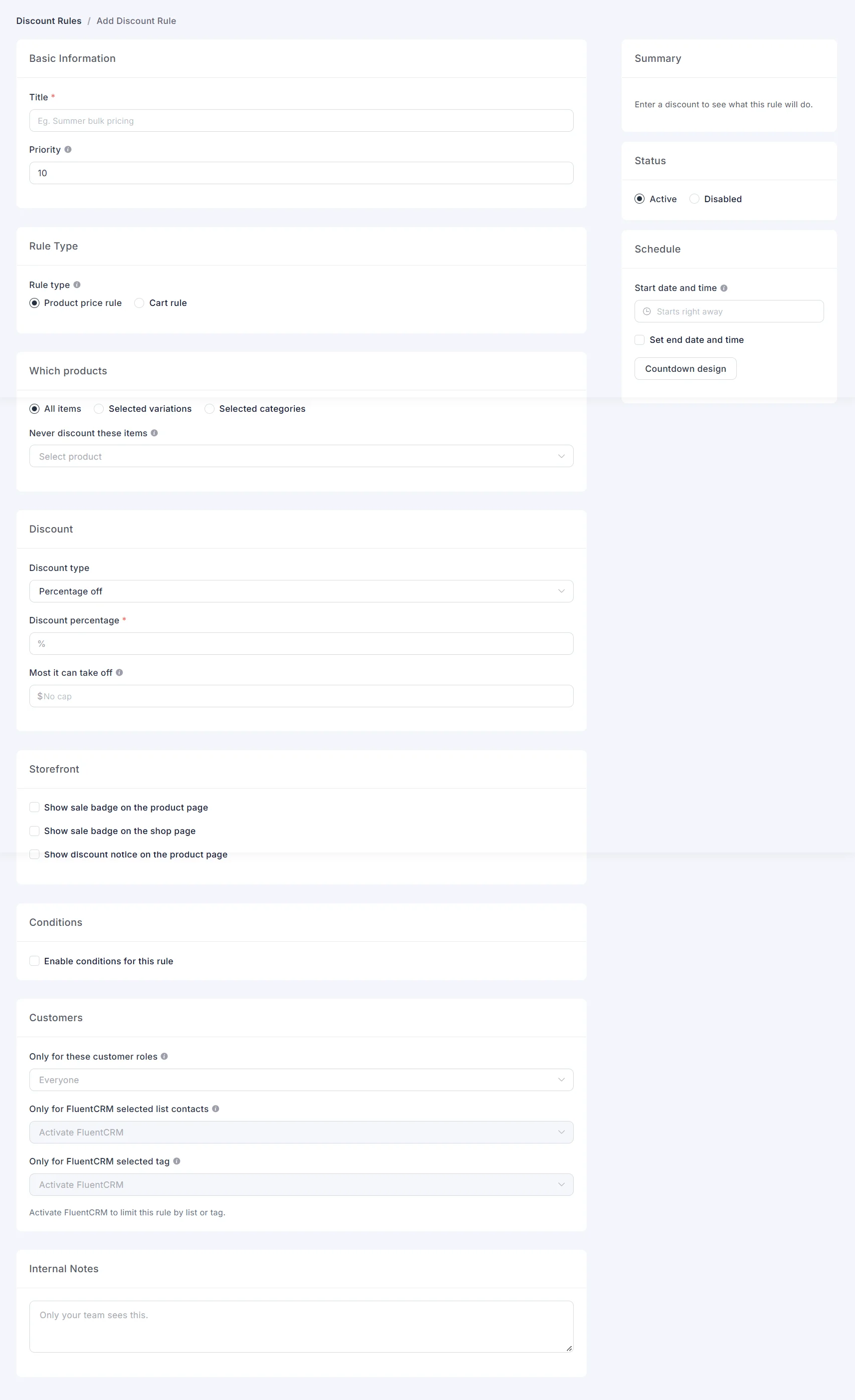
Each rule has a title, a priority, and a status of Active or Disabled. A disabled rule stays in the list and does not run. Internal notes are for your team. Shoppers never see them.
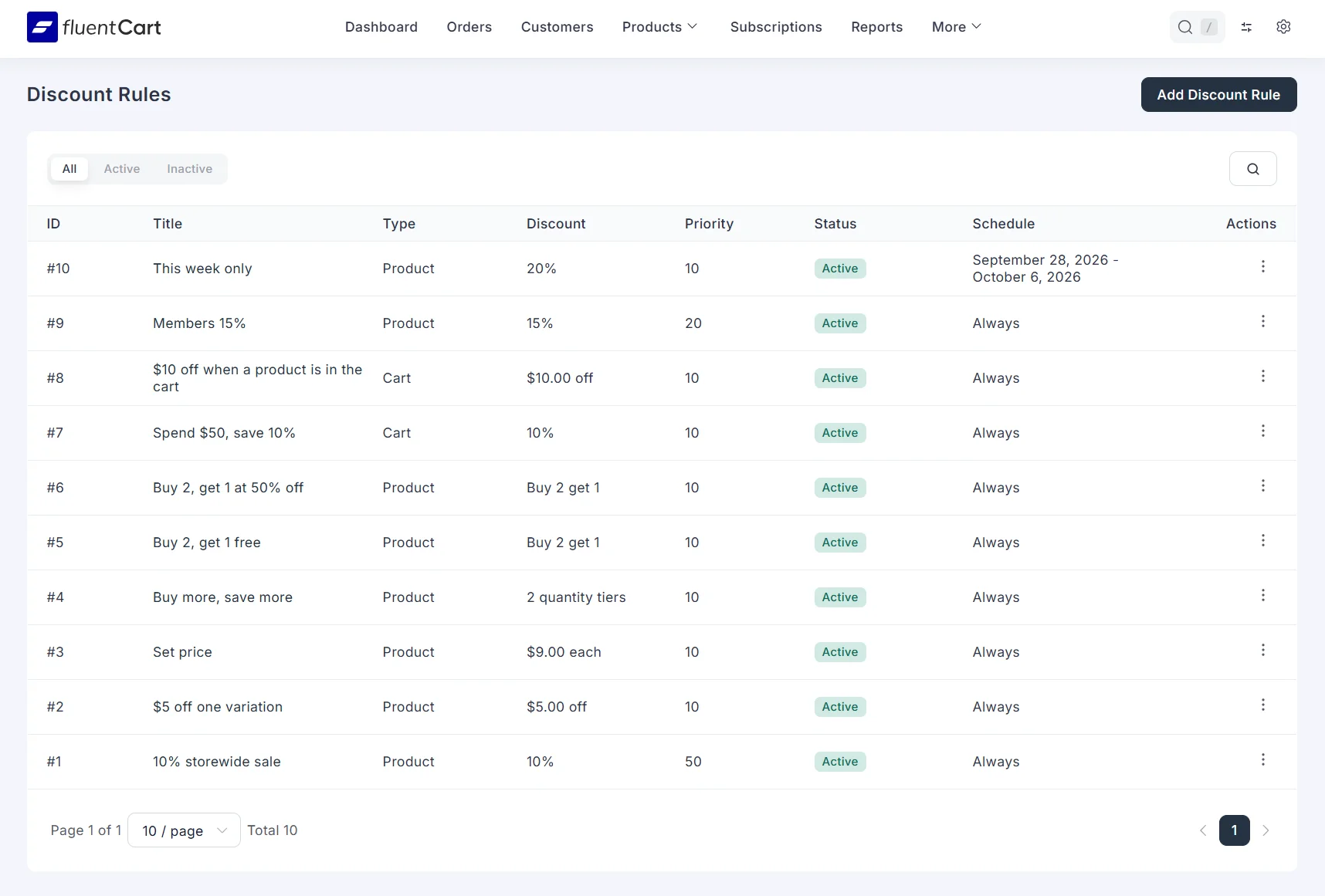
Enable Discount Rules is the store-wide switch. When it is off, Discount Rules is hidden in FluentCart and no discounts run. Saved rules stay.
The discounted price shows on the shop, the product page, the cart, and checkout. It carries through to the order, so the total, tax, and payment amount match the price the shopper saw.
Discount types
A product price rule changes the item price. A cart rule takes an amount off the whole cart, and it does not change the item price.
- Percentage off – set the percent. Most it can take off caps the amount. Leave the cap empty for no limit.
- Fixed amount off each item – take a set amount off every matching item.
- Fixed price per item – the shopper pays the price you set.
- Quantity tiers – each tier has a from quantity, a to quantity, and its own discount: a percentage, a fixed amount off each item, or a fixed price each. Leave To qty empty on the last tier to cover every larger quantity. The bulk pricing table on the product page follows the variation the shopper has selected.
- Buy X Get Y – they buy a set quantity and receive items free, at a percent off, or at an amount off. The reward can be the same variation or selected variations. The offer can repeat, and you can cap how many reward items they receive. If the reward is exactly one variation, the rule can add that variation to the cart when the offer qualifies.
Apply a product price rule to the whole catalog, to selected variations, or to selected categories. Never discount these items keeps those variations at full price even when the rule matches.
A cart rule takes a percentage off the cart, or a fixed amount off the cart. The line prices stay as they are. The discount shows on the cart total.
Conditions
Conditions are optional. With conditions off, the rule does not check the cart before it runs.
- Cart items – require that a product exists in the cart, or that it does not exist.
- Items subtotal – greater than, less than, or equal to an amount.
- Groups – rows in one group must all match. Groups combine with OR, so the rule runs when any group matches.
- Roles – limit a rule to selected WordPress roles. Leave roles empty to include guests and every logged-in customer.
- FluentCRM – limit a rule to selected lists or tags. Leave lists and tags empty to ignore them.
- Schedule – set a start date and an end date. Leave the start empty and the rule starts right away. Leave the end empty and the rule never ends. Show a countdown on the product page, and an optional banner across the site.
Sale badges sit on the product image or after the price, on the shop and the product page. Write your own badge text. A discount notice can use formatted text, and you choose where it appears on the product page.
When two product price rules match the same product, the lower priority number wins.
Setups you can build
These setups are live on the demo store. Each example shows the shop, the cart, and the rule settings.
- Take $5 off one color. The other colors of the same product stay at full price.
- Take 10% off one category. The rest of the catalog stays at full price.
- Set every variation of a product to one price.
- Buy more, save more. A small quantity is 10% off, and a larger quantity is 20% off, with no upper limit on the last tier.
- Buy 2, get 1 of the same item at 50% off, once.
- Buy 2, get 1 free, and let the offer repeat.
- Run a dated sale, with a countdown on the product page and a banner across the site.
- Spend $50 and take 10% off the cart. The item prices stay the same. The discount comes off the cart total.
- Limit a price to a wholesale role, or to a FluentCRM tag.
- Require one product in the cart, or block the discount when another product is present.
- Run a product price rule and a cart rule on the same order. When two product rules hit the same item, the lower priority number wins.
Get started
CartCubes Discount Rules for FluentCart is available now. Try the discounts on the demo store. See pricing and screenshots on the Discount Rules page, the walkthroughs on the examples, and the full notes on the changelog.

More from the blog
-

Wishlist 1.0.1: the heart stays with the variant
The wishlist heart stays clickable with image zoom, updates when the shopper changes a variant, and…
-

Toolbox 1.2.4: hold downloads until a date
Hold a file until a date and time, or limit who can download it, for the…
-
Toolbox 1.2.1: product order, external links, and account tabs
Set the shop product order, replace Add to Cart with an external link, and limit an…